Verify before save
Credentials are checked with the broker before saving. Invalid logins are rejected with a clear error.
Features
Broker-connected charts, Tego in text and voice, a community built on real trades, and risk tools — together in one workspace, on every screen.
Broker Connectivity
Broker connections
Accounts stay at your broker
Primary demo
#700000001
Strategy account
#700000018
Credentials are checked with the broker before saving. Invalid logins are rejected with a clear error.
Connect several accounts (limits per plan), switch the active account in one click, and compare accounts side-by-side in portfolio analytics.
Dropped broker sessions reconnect automatically, with a background sweep re-establishing flagged accounts every few minutes.
Create a broker demo account from inside the platform — choose a practice balance up to $200,000 at a fixed 1:1,000 leverage. No card or deposit required.
AI Assistant
Chat with an assistant connected to 51 governed AI assistant actions across research, charting, risk, reporting, and user-confirmed trade preparation. It reads live prices and your open positions, renders charts, checks your risk settings, and prepares orders — which only go to the broker after you explicitly confirm them.
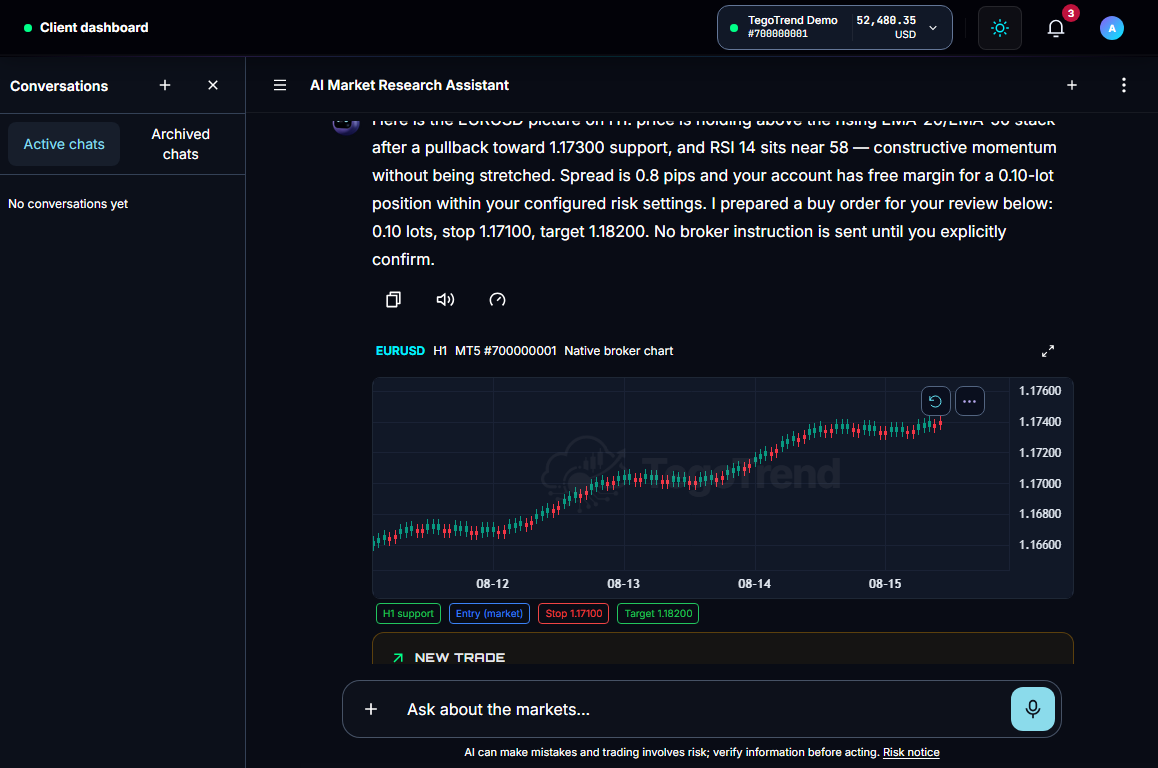
The assistant never trades on its own. Every prepared order becomes a pending card; chat-prepared orders expire after 5 minutes if you don't confirm them.
Analyst, Executor, Coach, Reviewer, Tutor — each changes the depth, starter prompts, and quick actions, never the rules.
Upload a chart screenshot and the assistant reads it in context — structure, levels, and what's visible on the image — as research input for your own decision.
A credit chip beside the composer shows the AI Credits you have left, and purchased credits never expire. Charts, the order ticket, and the journal never spend credits. How credits work →
AI context
Chart + account
Risk check
Within limits
Exposure
Portfolio aware
AI-generated market research — not investment advice. Always do your own analysis before trading.
Voice
BetaLive voice sessions run on the same governance as text: Tego listens, answers, and proposes; an order becomes a card that waits for your tap or your spoken confirmation.
Live voice · Tego
One voice, 6 language & dialect options
“Buy a tenth of a lot of euro-dollar with a forty-pip stop.”
“Prepared: EURUSD buy 0.10, stop 1.1708, target 1.1828. Say confirm or tap it.”
Speak over Tego and it stops mid-sentence. Playback speed runs from 0.25× to 3×.
English, Standard Arabic, and Egyptian, Saudi, Emirati and Lebanese Arabic — answered in the option you chose, not translated from formal Arabic.
Voice can prepare an order and read back every parameter. Nothing is sent until you confirm.
Voice Notes — recorded messages to Tego — come with every AI Trader plan. Live Conversation, the streaming back-and-forth, is included with every AI Trader plan. Talk to Tego →
AI-generated market research — not investment advice. Always do your own analysis before trading.
Charts
The broker-native chart workspace streams data straight from your connected broker — the same feed your terminal sees — in 5 layout presets with 11 dockable panels.
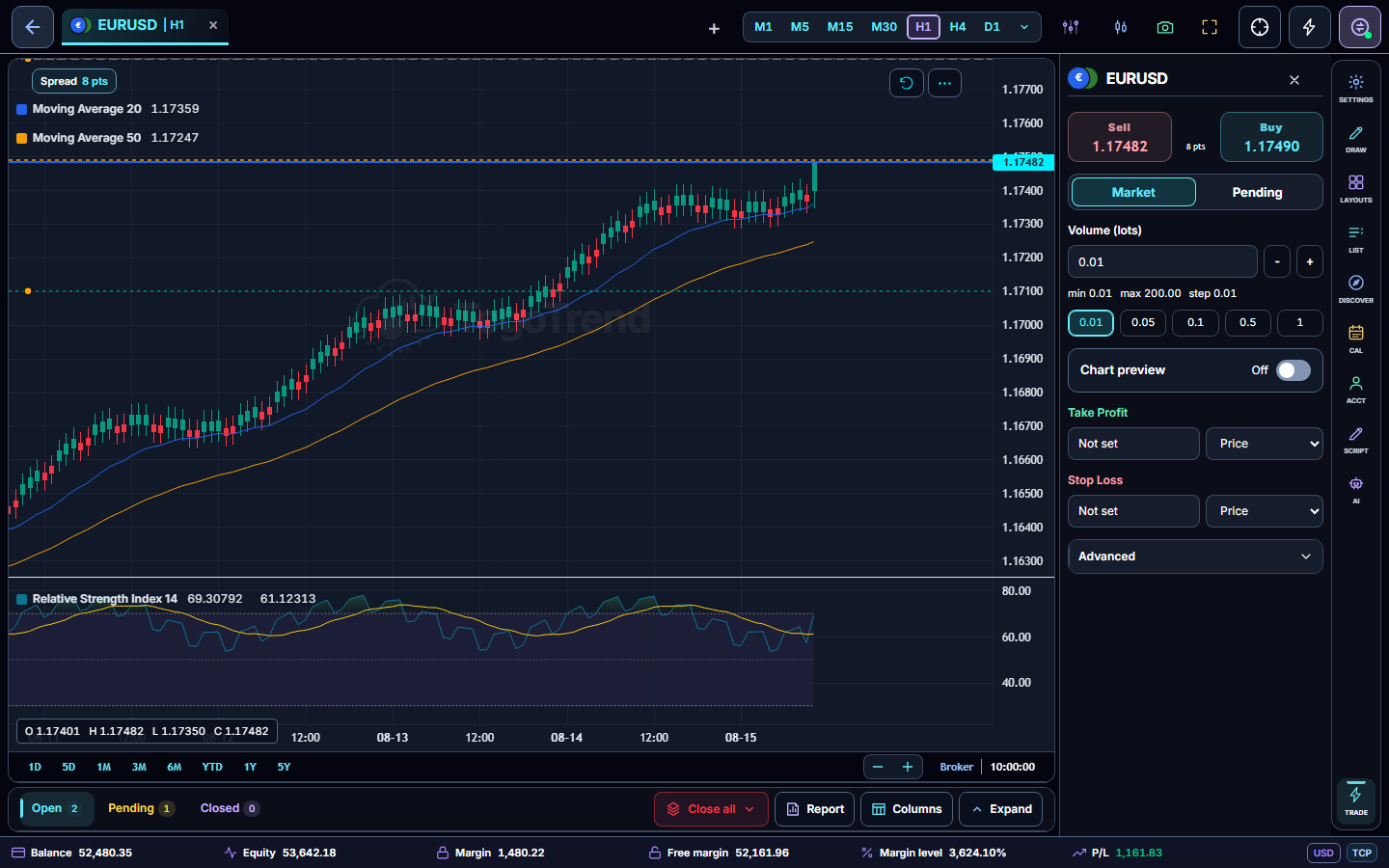
From moving averages, Bollinger Bands, RSI and Ichimoku to Volume Profile, VWAP variants, SuperTrend and squeeze studies. 121 TradingView-style studies are visually certified against TradingView's own rendering, with evidence captures. 3 studies labelled Premium are included with every paid plan. Browse the catalog →
M1, M5, M15, M30, H1, H4, D1, W1, MN — the public chart contract — plus trend lines, channels, Fibonacci, risk/reward blocks and annotations with persistent storage per symbol.
Write your own indicators in a Pine-familiar language on every plan — saved-script limits differ by plan — in a CodeMirror editor with a lint gutter and autocomplete, sandboxed, validated on every save, and shareable on the Marketplace. Explore ChartScript →
Drawings, studies, layouts, appearance settings, and watchlists are saved automatically and follow you between sessions and screens.
Trading Tools
Place market and pending orders from the ticket or directly on the chart, with protections that check conditions before anything reaches the broker.
Order ticket
Review modeMarket buy/sell plus 4 pending order types (limit and stop, both sides), partial closes, SL/TP modification, and bulk close actions — with trailing stops through the assistant's governed actions.
Stop loss and take profit in price, pips, money, or percent of balance — and drag the lines on the chart preview before you confirm.
Enable One-Click when you want speed; it stays off until you consent, and the pre-send checks still run on every order.
Symbol-aware tolerance (FX, metals, crypto, indices, energies) with a pre-send check that blocks the order if the spread widens or price moves beyond tolerance.
FX
EURUSDGBPJPY
Metals
XAUUSDXAGUSD
Crypto
BTCUSDETHUSD
Indices
US500US30
Energies
USOILUKOIL
Community
BetaMarket Signals start from a creator’s broker-verified order and settle on broker truth. Nothing here places a trade on your account.
GBPUSD · Sell
by trader-2c81 · swing
Entry range
1.3402–1.3418
Stop loss
1.3462
Take profit
1.3300
A signal exists only after the creator's broker accepted their real order. You prepare the same trade in your own account and confirm it yourself. Published Signals are also posted to the TegoTrend Telegram Signals channel. Signals →
Preparing a Signal builds the order in your own account with the creator's levels. Nothing reaches your broker until you confirm it. How following works →
Approved creators publish from Signal Studio with broker evidence attached, a locked identity, and a rating that cannot be bought. Creator program →
Ask Tego about any Signal and it analyzes the terms — it will not tell you to follow or copy.
AI-generated market research — not investment advice. Always do your own analysis before trading.
Risk & Portfolio
NewRisk tooling spans the moment before an order and the months after it — from position sizing to portfolio history.
Equity
$24,842
+2.4%
Drawdown
3.1%
Within limit
Win rate
58%
42 trades
Symbol exposure
Set a maximum lot size per trade, a daily-loss limit in your account currency, and an allowed-symbol list. The platform enforces them on governed order paths.
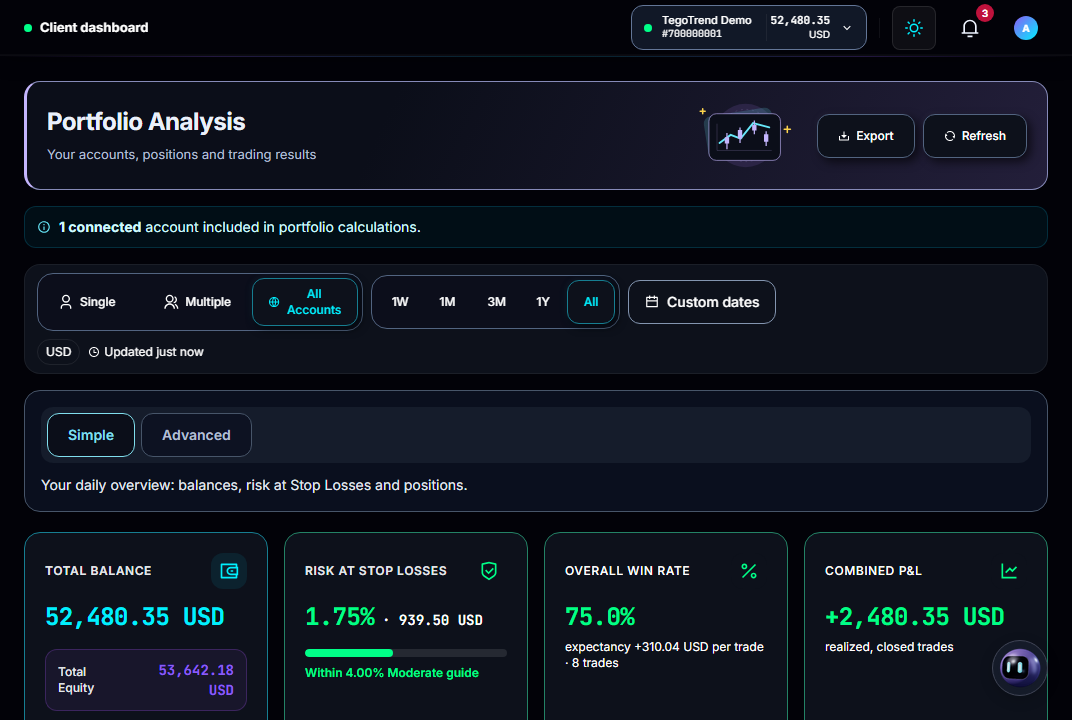
Simple and Advanced views: allocation, exposure by symbol and currency, and ratios computed from realized results — the platform never converts between currencies behind your back. Portfolio Analysis →
Open and closed trades sync from the broker automatically, with your own notes on top — entries, exits, and P&L recorded against real fills.
Simple Trading History reports as CSV or PDF on every plan, Full Analysis PDFs on every paid plan, with an AI-written summary on every AI Trader plan, and a reports library that keeps each file for 30 days.
Notifications
Notifications are produced server-side, so they reach you whether or not the workspace is open.
Position closed · take profit
Just nowEURUSD buy 0.10 closed at 1.17500
Broker session restored
2mAccount reconnected after a dropped bridge
New sign-in confirmed
8mTwo-factor code verified for this session
A notification when a position closes by stop loss, take profit, or stop-out — you never have to work it out from the balance.
A disconnected account, a failed reconnect, or a dropped broker bridge raises a notification; reconnects and removals are recorded in-app.
Everything lands in the Notifications page inside the workspace and the critical events also go out by email. Link your account to @TegoTrend_Bot in Settings and trade, connectivity, risk and security events reach you on Telegram too — where you can also chat with Tego and review positions from the bot.
Quotes, fills, and position changes stream to the browser in real time while you work — the notification is the record, not the only signal.
Team & Operations
The same discipline that governs your orders governs the people who run the platform.
Audit trail
Operations staff work with scoped roles; sensitive changes such as tier updates and payouts go through maker/checker approval.
Every administrative action is recorded with who, what, and when — lockouts, session revocations, and tier changes included.
Active sessions can be reviewed and revoked; API, database, and broker-bridge health is monitored continuously.
In-app tickets with categories, priorities, and threaded replies; Pro and Gold on Trader and AI Trader plans get priority handling, with the highest queue priority on Gold.
Start with the 7-day Free Trial and a broker demo account. Features remain governed by your subscription plan, so paid-only tools unlock only after you upgrade. Practice the included demo workflow before connecting a live broker.
Risk warning: Trading and investing involve substantial risk. You can lose some or all of the money committed, and leveraged or margined products may create losses greater than the initial amount deposited. Do not trade or invest money you cannot afford to lose.